Lecture 14 | Module 3: Virtual Assistance
FA Facilitator Oct 28, 2026 20 pages 3 views PPTX
Free preview: 3 of 20 pages
Paid

Pages 4 to 20 are for buyers
Buy once and read it in full on any device, any time.
Freelancing Mastery Course - 30 Complete Lectures (6 Modules)
18 documents in this bundle
$49.00
$19.00
Get full access
Bought it already? Log in to read.
About this document
If they said Excel — do not send Google Sheets link. Client asked for Excel (.xlsx) — you sent a Google Sheets link. These 5 functions handle 90% of all client data cleaning tasks. 4 Lead generation is the highest-paid data task.
Document text
T H E F A C I L I T A T O R S A C A D E M Y
Lecture 14 | Module 3: Virtual Assistance
Data Entry
& Research
Tasks
Accuracy, speed and professional delivery
of the most in-demand VA tasks
Duration: 60–70 minutes • Laptop + Google Sheets open
Supervised by: Muhammad Sohail Ashraf
20+ Years Freelancing Experience
The Facilitators Academy • Lecture 14: Data Entry & Research Tasks • thefacilitators.net • +92 304 5224838
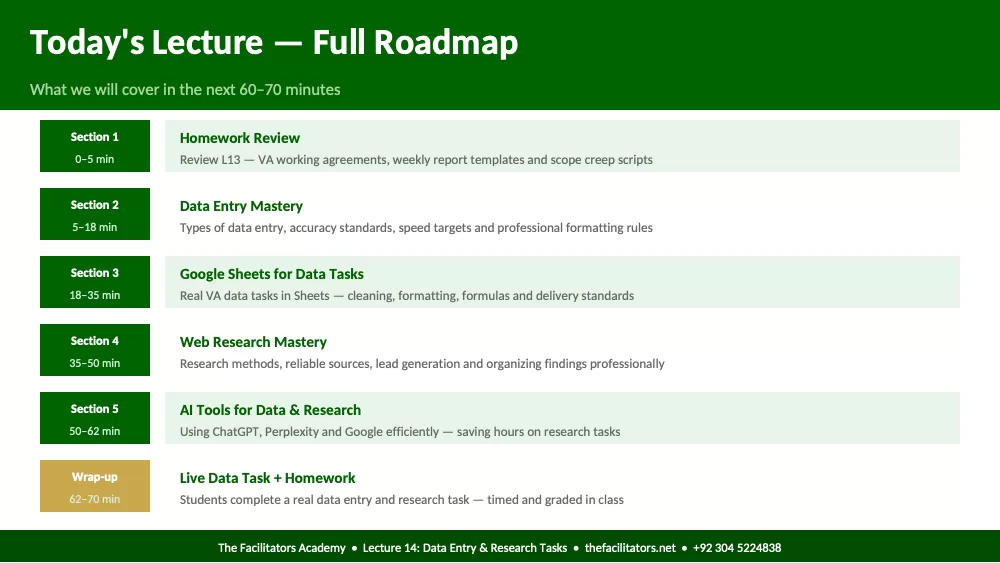
Today's Lecture — Full Roadmap
What we will cover in the next 60–70 minutes
Section 1
0–5 min
Homework Review
Review L13 — VA working agreements, weekly report templates and scope creep scripts
Section 2
5–18 min
Data Entry Mastery
Types of data entry, accuracy standards, speed targets and professional formatting rules
Section 3
18–35 min
Google Sheets for Data Tasks
Real VA data tasks in Sheets — cleaning, formatting, formulas and delivery standards
Section 4
35–50 min
Web Research Mastery
Research methods, reliable sources, lead generation and organizing findings professionally
Section 5
50–62 min
AI Tools for Data & Research
Using ChatGPT, Perplexity and Google efficiently — saving hours on research tasks
Wrap-up
62–70 min
Live Data Task + Homework
Students complete a real data entry and research task — timed and graded in class
The Facilitators Academy • Lecture 14: Data Entry & Research Tasks • thefacilitators.net • +92 304 5224838
Lecture 13 Homework Review
Section 1 • Minutes 0–5 • Share your work with the class
Task 1
VA working agreement written
Read your key boundaries aloud — working hours, response time, scope and revision policy. Is it specific enough for
a real client?
Task 2
Weekly report template created
Show the filled template. Does it have completed tasks, blockers, hours used and next week plan? Class gives
feedback.
Task 3
Scope creep response scripts
Read your best script aloud. Class votes: is it firm enough? Is it still polite and professional?
Task 4
Difficult client templates — Bonus
Show your Google Drive folder. Are the scripts organized and ready to paste into a real client conversation?
The Facilitators Academy • Lecture 14: Data Entry & Research Tasks • thefacilitators.net • +92 304 5224838
Section 2
Data Entry Mastery
Minutes 5–18 • Types, accuracy standards and professional formatting
The Facilitators Academy • Lecture 14: Data Entry & Research Tasks • thefacilitators.net • +92 304 5224838
Data Entry — Types, Standards and What Clients Expect
Accuracy is non-negotiable — one wrong number in a spreadsheet costs clients real money
One wrong number in a financial spreadsheet, one misspelled name in a CRM, one wrong email in a contact list — these cost clients real
money. Accuracy is non-negotiable in ALL data tasks.
Contact List Building
Collecting names, emails, phones and company info into a spreadsheet. Common for
sales teams and CRM updates.
Standard: No duplicates. Consistent formatting — First Name/Last Name in separate
columns. Verified emails. Delivered in the format the client specified.
Financial Data Entry
Entering invoices, expenses, receipts and transactions into spreadsheets or
accounting tools.
Standard: Double-check every number. Use exact client categories. Never round
figures. Date format must match client preference (DD/MM/YYYY vs MM/DD/YYYY).
eCommerce Data Entry
Uploading product listings, prices, descriptions, SKUs and images to Amazon, Shopify
or Daraz.
Standard: Follow platform exact format. Never truncate titles. Verify prices match
source file. Image filenames must match SKU codes.
CRM Data Entry
Adding or updating client records, deal stages, contact notes and follow-up dates in
HubSpot, Salesforce or Pipedrive.
Standard: Consistent data across all records. No fields blank without reason. Tags
used correctly. Notes clear and professional.
The Facilitators Academy • Lecture 14: Data Entry & Research Tasks • thefacilitators.net • +92 304 5224838
The 10 Data Quality Rules Every VA Must Follow
Print this and check every data task against it before delivering to the client
1 Consistency: Use the same format throughout — dates, names, phones, currency. Mixed formats destroy data usability.
2 No duplicates: Sort data and scan for duplicates before delivering. Remove all duplicates unless client specifically said to keep them.
3 Correct columns: Never merge cells unless requested. Each data point goes in its own column — not combined with others.
4 Verify the source: Copy from a document or website — verify 3 data points manually. Never blindly copy — always spot-check accuracy.
5 No blank cells: Every cell should have data or 'N/A'. Empty cells create confusion — mark missing data clearly so client knows.
6 Right format: Deliver in the format the client asked. If they said Excel — do not send Google Sheets link. If CSV — export CSV.
7 Clean text: No extra spaces before or after text. No unnecessary capitalization. Use =TRIM() in Sheets to clean imported text automatically.
8 Sort logically: Sort data before delivering — alphabetically by name, chronologically by date, or as client specified. Never deliver unsorted.
9 Name correctly: File name must include: project name, date and version. Example: 'Leads_Ahmed_Restaurant_May2026_v1.xlsx'. Never
'data.xlsx'.
10 Self-check: Re-read client's original instructions before sending. Does your deliverable match every requirement they listed?
The Facilitators Academy • Lecture 14: Data Entry & Research Tasks • thefacilitators.net • +92 304 5224838
Section 3
Google Sheets for Data Tasks
Minutes 18–35 • Cleaning, formatting, formulas and delivery
The Facilitators Academy • Lecture 14: Data Entry & Research Tasks • thefacilitators.net • +92 304 5224838
Google Sheets — Data Cleaning & Formatting for VAs
Clients frequently send messy data — your job is to return it clean, organized and usable
Open G
Showing the first pages. Read the full document above.
Comments (0)
Log in to join the discussion.