Lecture 11 | Module 3: Virtual Assistance
FA Facilitator Oct 28, 2026 20 pages 3 views PPTX
Free preview: 3 of 20 pages
Paid
Pages 4 to 20 are for buyers
Buy once and read it in full on any device, any time.
Freelancing Mastery Course - 30 Complete Lectures (6 Modules)
18 documents in this bundle
$49.00
$19.00
Get full access
Bought it already? Log in to read.
About this document
Q2 Which ONE category from the task library feels most natural to you — email, calendar, research, data entry, project support or eCommerce? What they need: Customer service, data entry, document management, project coordination. What they need: Product listings, order processing, customer service, inventory tracking.
Document text
T H E F A C I L I T A T O R S A C A D E M Y
Lecture 11 | Module 3: Virtual Assistance
What Does
a VA Do?
The complete VA role guide —
tasks, tools, client types and specializations
Duration: 60–70 minutes • Bring your admin skills list from homework
Supervised by: Muhammad Sohail Ashraf
20+ Years Freelancing Experience
The Facilitators Academy • Lecture 11: What Does a VA Do? • thefacilitators.net • +92 304 5224838
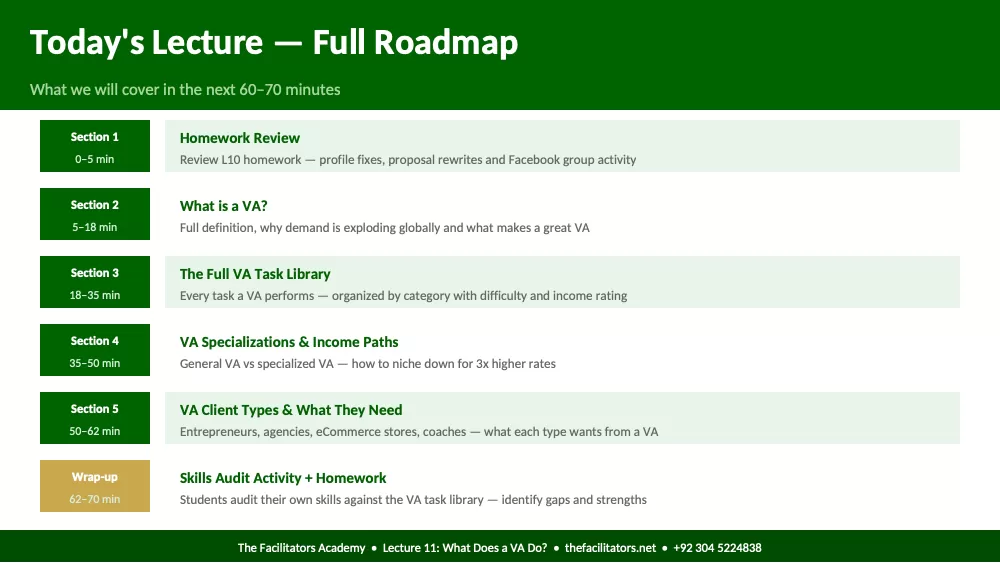
Today's Lecture — Full Roadmap
What we will cover in the next 60–70 minutes
Section 1
0–5 min
Homework Review
Review L10 homework — profile fixes, proposal rewrites and Facebook group activity
Section 2
5–18 min
What is a VA?
Full definition, why demand is exploding globally and what makes a great VA
Section 3
18–35 min
The Full VA Task Library
Every task a VA performs — organized by category with difficulty and income rating
Section 4
35–50 min
VA Specializations & Income Paths
General VA vs specialized VA — how to niche down for 3x higher rates
Section 5
50–62 min
VA Client Types & What They Need
Entrepreneurs, agencies, eCommerce stores, coaches — what each type wants from a VA
Wrap-up
62–70 min
Skills Audit Activity + Homework
Students audit their own skills against the VA task library — identify gaps and strengths
The Facilitators Academy • Lecture 11: What Does a VA Do? • thefacilitators.net • +92 304 5224838
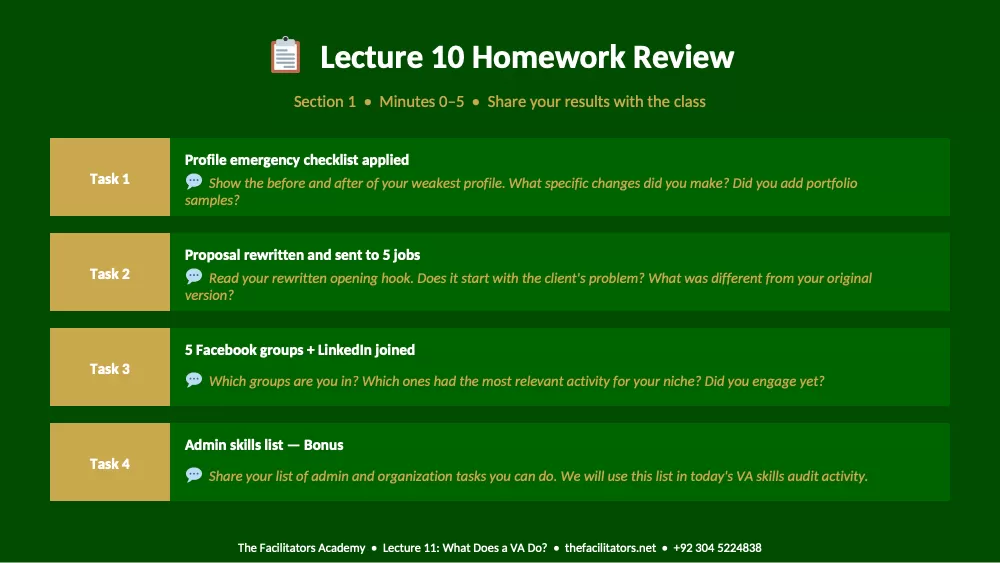
Lecture 10 Homework Review
Section 1 • Minutes 0–5 • Share your results with the class
Task 1
Profile emergency checklist applied
Show the before and after of your weakest profile. What specific changes did you make? Did you add portfolio
samples?
Task 2
Proposal rewritten and sent to 5 jobs
Read your rewritten opening hook. Does it start with the client's problem? What was different from your original
version?
Task 3
5 Facebook groups + LinkedIn joined
Which groups are you in? Which ones had the most relevant activity for your niche? Did you engage yet?
Task 4
Admin skills list — Bonus
Share your list of admin and organization tasks you can do. We will use this list in today's VA skills audit activity.
The Facilitators Academy • Lecture 11: What Does a VA Do? • thefacilitators.net • +92 304 5224838
Section 2
What is a Virtual Assistant?
Minutes 5–18 • Definition, global demand and what makes a great VA
The Facilitators Academy • Lecture 11: What Does a VA Do? • thefacilitators.net • +92 304 5224838
What is a Virtual Assistant — And Why is Demand Exploding?
The VA industry is one of the fastest growing in the global remote work economy
"A Virtual Assistant (VA) is a remote professional who provides administrative, technical or creative support to businesses and
entrepreneurs — working from their own location using digital tools."
$19.6 Billion
Global VA market size in 2024
40%
Annual market growth rate
59%
Small businesses using VAs
$10–50/hr
Typical VA hourly rate globally
Why Businesses Need VAs Right Now:
Cost saving: Hiring a VA costs 60–80% less than a full-time employee — no office, no benefits, no taxes
Flexibility: Business owners only pay for the hours they need — no 8-hour commitment required
Focus: Delegating admin tasks frees the owner to focus on revenue-generating activities
Scalability: A business can add or reduce VA hours instantly based on workload — impossible with employees
Global talent: Businesses access skilled professionals worldwide at competitive rates — Pakistan is a top source
The Facilitators Academy • Lecture 11: What Does a VA Do? • thefacilitators.net • +92 304 5224838
What Makes a Great VA — The Qualities Clients Pay Premium
For
Technical skills matter — but these qualities determine if clients keep you long-term
Reliability
You do what you say, when you said you would. This single quality is more
valuable than any technical skill. Clients leave VAs who are unreliable — no
matter how talented.
Proactiveness
You do not wait to be asked. You see a problem and solve it. You see an
opportunity and flag it. Great VAs think like business partners — not
task-completers.
Confidentiality
VAs access private emails, financial data and business strategy. Clients MUST
trust you completely. Never share client information — even casually. This is a
career-ending mistake.
Communication
Reply fast. Give updates without being asked. Tell clients if something will be
late BEFORE the deadline. Clear, professional communication is the #1 reason
VAs get retained long-term.
Willingness to Learn
Every client works differently. Every business uses different tools. The best VAs
adapt fast and say 'I will figure that out' instead of 'I do not know how to do
that.'
Attention to Detail
Typos in emails, wrong dates in calendars, incorrect data in spreadsheets —
these small errors cost clients money and trust. Proofread everything twice
before delivering.
The Facilitators Academy • Lecture 11: What Does a VA Do? • thefacilitators.net • +92 304 5224838
Section 3
The Full VA Task Library
Minutes 18–35 • Every task a VA performs — organized by category
The Facilitators Academy • Lecture 11: What Does a VA Do? • thefacilitators.net • +92 304 5224838
VA Task Library — Part 1: Admin & Communication
The core tasks every VA must master — these are requested in 80% of all VA job posts
Email Management
• Sorting and organizing inbox into folders and categories
• Drafting and sending replies on behalf of the client
• Flagging urgent emails for client attention
• Unsubscribing from spam and newsletters
• Setting up email filters and auto-responders
• Following up on unanswered emails
Calendar & Scheduling
• Scheduling meetings and appointments
• Sending meeting reminders and confirmations
• Managing time zones for international calls
• Blocking focus time and protecting personal hours
• Rescheduling and cancelling when needed
• Setting up recurring ev
Showing the first pages. Read the full document above.
Comments (0)
Log in to join the discussion.