Lecture 18 | Module 4: Digital Marketing & AI
FA Facilitator Oct 28, 2026 20 pages 4 views PPTX
Free preview: 3 of 20 pages
Paid
Pages 4 to 20 are for buyers
Buy once and read it in full on any device, any time.
Freelancing Mastery Course - 30 Complete Lectures (6 Modules)
18 documents in this bundle
$49.00
$19.00
Get full access
Bought it already? Log in to read.
About this document
Set up client Brand Kit in Canva with exact colors (hex codes), logo PNG and 2 approved fonts. Set up: 3 brand colors (with hex codes), 2 fonts and upload a logo PNG. Screenshot the Brand Kit and share in WhatsApp group.
Document text
T H E F A C I L I T A T O R S A C A D E M Y
Lecture 18 | Module 4: Digital Marketing & AI
Content
Creation
& Canva
Design professional graphics, build brand
consistency and master Canva AI features
Duration: 60–70 minutes • Open Canva.com on your laptop
Supervised by: Muhammad Sohail Ashraf
20+ Years Freelancing Experience
The Facilitators Academy • Lecture 18: Content Creation & Canva • thefacilitators.net • +92 304 5224838
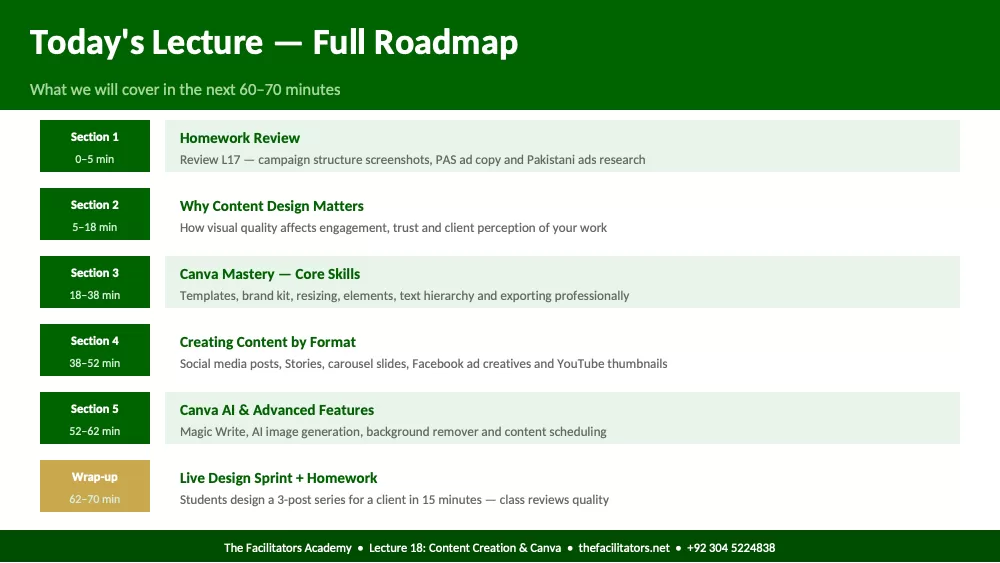
Today's Lecture — Full Roadmap
What we will cover in the next 60–70 minutes
Section 1
0–5 min
Homework Review
Review L17 — campaign structure screenshots, PAS ad copy and Pakistani ads research
Section 2
5–18 min
Why Content Design Matters
How visual quality affects engagement, trust and client perception of your work
Section 3
18–38 min
Canva Mastery — Core Skills
Templates, brand kit, resizing, elements, text hierarchy and exporting professionally
Section 4
38–52 min
Creating Content by Format
Social media posts, Stories, carousel slides, Facebook ad creatives and YouTube thumbnails
Section 5
52–62 min
Canva AI & Advanced Features
Magic Write, AI image generation, background remover and content scheduling
Wrap-up
62–70 min
Live Design Sprint + Homework
Students design a 3-post series for a client in 15 minutes — class reviews quality
The Facilitators Academy • Lecture 18: Content Creation & Canva • thefacilitators.net • +92 304 5224838
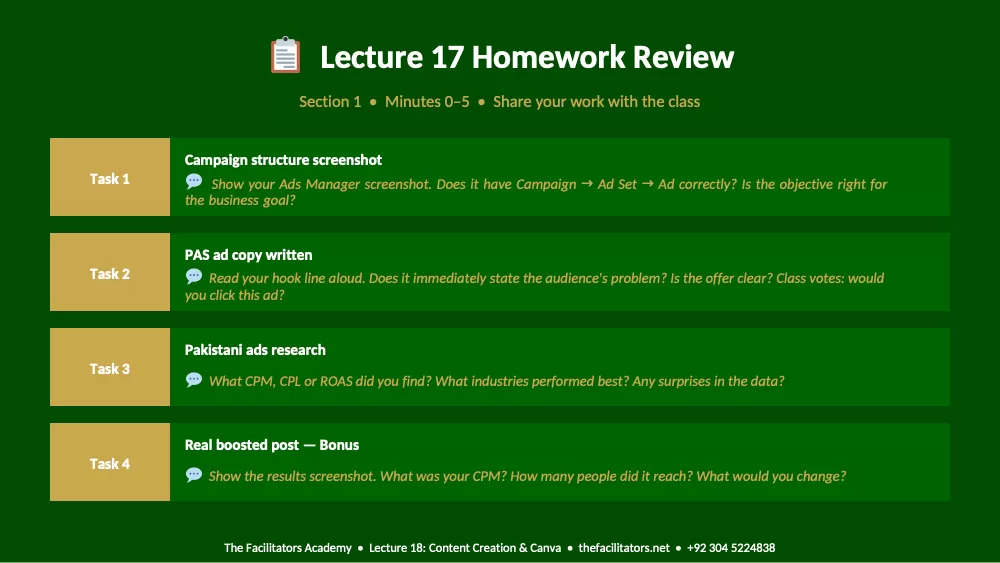
Lecture 17 Homework Review
Section 1 • Minutes 0–5 • Share your work with the class
Task 1
Campaign structure screenshot
Show your Ads Manager screenshot. Does it have Campaign → Ad Set → Ad correctly? Is the objective right for
the business goal?
Task 2
PAS ad copy written
Read your hook line aloud. Does it immediately state the audience's problem? Is the offer clear? Class votes: would
you click this ad?
Task 3
Pakistani ads research
What CPM, CPL or ROAS did you find? What industries performed best? Any surprises in the data?
Task 4
Real boosted post — Bonus
Show the results screenshot. What was your CPM? How many people did it reach? What would you change?
The Facilitators Academy • Lecture 18: Content Creation & Canva • thefacilitators.net • +92 304 5224838
Section 2
Why Content Design Matters
Minutes 5–18 • Visual quality, trust and client perception
The Facilitators Academy • Lecture 18: Content Creation & Canva • thefacilitators.net • +92 304 5224838
Visual Content — Why Quality Changes Everything
Clients judge the quality of your work by the quality of your visuals — before they read a single word
Research shows people form an opinion about visual content in 0.05 seconds. A well-designed post communicates professionalism, trust
and credibility — before anyone reads the caption.
90%
of information transmitted to the brain is
visual — text is processed 60,000x slower
than images
650%
higher engagement for posts with
high-quality visuals vs text-only posts on
social media
94%
more views on content with relevant images
vs content without — visuals drive clicks
3x
more shares for visual content — people
share what looks good, not just what says
something good
What Poor Design Costs Your Clients:
✗ Lower engagement: Poorly designed posts get 60% fewer likes, comments and shares than well-designed equivalents
✗ Less trust: Inconsistent or amateur design signals to buyers that the business is not serious or professional
✗ Higher ad costs: Facebook rewards high-engagement ads with lower CPM. Bad creative = more expensive ads
✗ Lost clients: Potential customers see a competitor's polished content and choose them instead — design is a sales tool
The Facilitators Academy • Lecture 18: Content Creation & Canva • thefacilitators.net • +92 304 5224838
5 Design Principles Every Content Creator Must Know
You do not need to be a designer — you need to know these 5 rules
1 Hierarchy:
Make the most important element the largest. Headline > Subheadline > Body text. Eye naturally moves from largest to smallest. Never give equal
weight to everything — viewers need a reading path.
2 Contrast:
Use high contrast between text and background. Dark text on light background or light text on dark background. Never put white text on light yellow
— unreadable. Contrast creates clarity.
3 White Space:
Empty space is not wasted space. It gives elements room to breathe and makes designs feel premium. Overcrowded design looks cheap. Less is always
more in professional content.
4 Consistency:
Use the same 2–3 colors, same 2 fonts, same logo position across all posts. Brand consistency makes a page look professional and builds visual
recognition over time.
5 Alignment:
Every element should align with something — left edge, center or right edge. Never place text or images randomly. Canva's alignment guides show you
— use them every time.
The Facilitators Academy • Lecture 18: Content Creation & Canva • thefacilitators.net • +92 304 5224838
Section 3
Canva Mastery — Core Skills
Minutes 18–38 • Templates, brand kit, resizing and exporting
The Facilitators Academy • Lecture 18: Content Creation & Canva • thefacilitators.net • +92 304 5224838
Canva Interface — Know Every Panel Before You Design
Open Canva now — follow along as we walk through the interface together
Canva.com is free. Go to canva.com → Sign Up with Google → Create a Design. Follow along live. Everything in today's lecture is
done in real-time — you practice as we teach.
Left Sidebar
• Templates — 500,000+ free templates sorted by category
and size. Search 'Instagram post', 'Facebook ad', 'Story'.
Always start with a template — never blank canvas.
• Elements — shapes, lines, illustrations, photos, videos,
audio, charts, tables, AI image generator. Use the search bar
for specific elements.
• Text — add heading, subheading or body text. Choose from
hundreds of font combinations. Font Pair r
Showing the first pages. Read the full document above.
Comments (0)
Log in to join the discussion.